
Install NDDS (NVIDIA Deep Learning Dataset Synthesizer)
2020-11-01
Introduction
This post explains how to install NDDS (NVIDIA Deep Learning Dataset Synthesizer) on your PC.
To generate synthetic datasets for training deep neural network models, NVIDIA provides an Unreal Engine 4–based library called NVIDIA Deep Learning Dataset Synthesizer (NDDS). NDDS allows you to create large, labeled datasets directly from simulated 3D environments, which is especially useful when collecting real-world data is difficult or expensive.
Prerequisites
NDDS requires Unreal Engine 4.22.
If you have not installed Unreal Engine yet, follow this tutorial first:
https://jiteshgosar.com/install-unreal-engine-4-ubuntu/
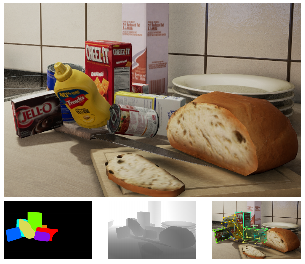
Steps to install NDDS
1. Install Unreal Engine 4.22
Make sure Unreal Engine version 4.22 is installed and working.
Installation guide:
https://jiteshgosar.com/install-unreal-engine-4-ubuntu/
2. Install Git Large File Storage (LFS)
NDDS uses Git LFS to manage large binary assets, so Git LFS must be installed before downloading the project.
Download Git LFS
You can download Git LFS from either:
- Direct package:
https://github.com/git-lfs/git-lfs/releases/download/v2.11.0/git-lfs-linux-amd64-v2.11.0.tar.gz - Official site:
https://git-lfs.github.com/
Install Git LFS
Uncompress the downloaded package and run the following commands from inside the extracted directory:
sudo ./install.sh
git lfs install
3. Install NDDS
Download NDDS
Navigate to your workspace directory and clone the NDDS repository using Git LFS:
git lfs clone https://github.com/NVIDIA/Dataset_Synthesizer.gitIf git lfs clone does not work, you can download NDDS directly from this release archive:
https://github.com/NVIDIA/Dataset_Synthesizer/releases/download/1.2.2/ndds_1.2.2.zip
Build the NDDS Unreal project
Move into the NDDS source directory and build the Unreal project. This step takes time (around 1–2 hours depending on your system), but it is required.
cd Dataset_Synthesizer/Source
unrealgen NDDS.uproject
unrealbuild NDDS.uproject
If a window appears asking about missing NDDS modules, select Yes.
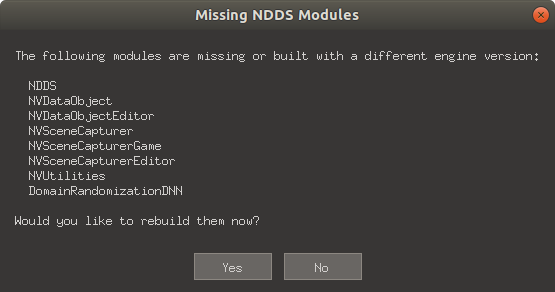
Run the NDDS project
Make sure you are inside the Dataset_Synthesizer/Source directory, then launch Unreal Editor with the NDDS project:
unrealeditor NDDS.uprojectThis will open Unreal Engine with the NDDS project loaded.
Video tutorial
I plan to add a video tutorial covering this installation process and other related topics on my YouTube channel:
17 Jutsu
https://www.youtube.com/channel/UCNoGSPhTJ5ipcWa2Ai4mM_g
If you want updates, consider subscribing to the channel.