
Install Unreal Engine 4 on Ubuntu (UE4 Tutorial)
2020-11-01
Introduction
This post walks through the complete process of installing Unreal Engine 4 (UE4) on Ubuntu.
Unreal Engine is one of the most advanced real-time 3D creation engines available today. While it started as a game engine, it is now widely used across industries for simulations, interactive experiences, and virtual worlds.
I have personally used Unreal Engine for:
- building a small Android game for learning and experimentation
- generating synthetic image datasets using NVIDIA’s NDDS plugin for machine learning
If you are planning to work with UE4 on Linux, the steps below will help you get a working setup from source.
Install Unreal Engine 4 on Ubuntu
You can follow the official documentation or use the practical steps below:
Official documentation:
https://docs.unrealengine.com/en-US/Platforms/Linux/BeginnerLinuxDeveloper/SettingUpAnUnrealWorkflow/index.html
1. Create and configure an Epic Games account
- Register for an Epic Games account:
https://www.unrealengine.com/en-US/ - Choose the Creators License during registration.
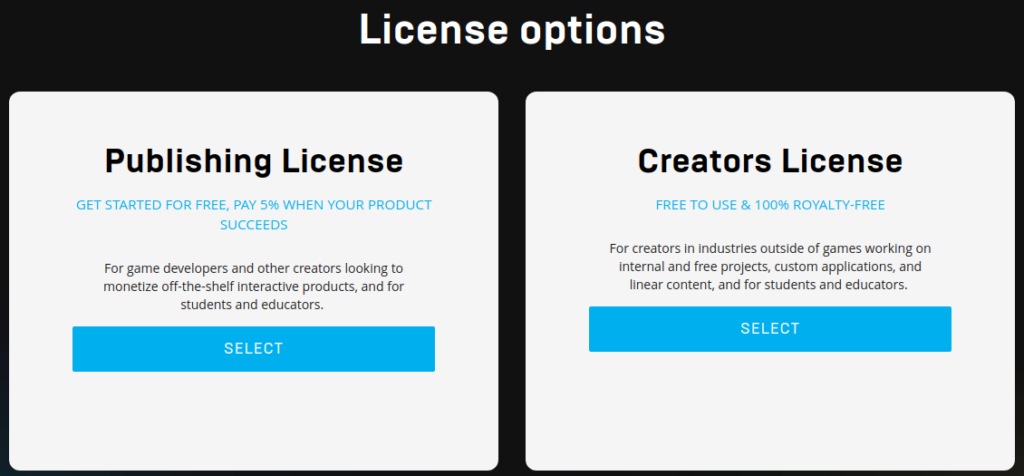
2. Connect Epic Games with GitHub
Unreal Engine source code is hosted on GitHub and requires account linking.
- Connect your Epic Games account to your GitHub account.
- Accept the Epic Games organization invitation on GitHub.
Clone Unreal Engine source code
Open a terminal and run:
git clone https://github.com/EpicGames/UnrealEngine.gitClone a specific Unreal Engine version (recommended)
If you only need a specific version (for example UE 4.22), clone that branch directly:
git clone -b 4.22 https://github.com/EpicGames/UnrealEngine.gitDuring cloning, you will be prompted to enter your GitHub credentials.

Build Unreal Engine on Ubuntu
Move into the Unreal Engine directory and run the setup and build steps:
cd UnrealEngine   # Repository size ~1.4 GB
./Setup.sh
./GenerateProjectFiles.sh
make
If a popup appears asking to register UE file types, select Yes.
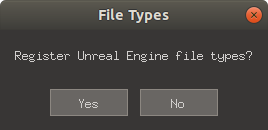
Note: The build process can take a significant amount of time depending on your system.
Optional: Add helper commands to .bashrc
To simplify working with Unreal Engine projects, you can add helper functions to your shell.
Open .bashrc
nano ~/.bashrcAdd Unreal Engine helper functions
UE_HOME=/home/jitesh/3d/UnrealEngine  # Change this to your UE4 directory path

function unrealbuild {
    CURR_DIR=`pwd`
    PROJ_NAME=$(basename ${1%.uproject})
    $UE_HOME/Engine/Build/BatchFiles/Linux/Build.sh         $PROJ_NAME Linux Development -editorrecompile         "${CURR_DIR}/${PROJ_NAME}.uproject" -progress -editor -game -NoHotReloadFromIDE
}
complete -f -X '!*.@(uproject)' unrealbuild

function unrealeditor {
    DIR="$( cd "$( dirname "$i" )" && pwd )"
    $UE_HOME/Engine/Binaries/Linux/UE4Editor $DIR/$1
}
complete -f -X '!*.@(uproject)' unrealeditor

function unrealgen {
    DIR="$( cd "$( dirname "$i" )" && pwd )"
    pushd $UE_HOME
    ./GenerateProjectFiles.sh -project="$DIR/$1" -game -engine -editor
    popd
}
complete -f -X '!*.@(uproject)' unrealgen

# For automation tests (optional)
function unrealtest {
    DIR="$( cd "$( dirname "$i" )" && pwd )"
    $UE_HOME/Engine/Binaries/Linux/UE4Editor $DIR/$1         -Game -ExecCmds="Automation RunTests $2" -log
}
complete -f -X '!*.@(uproject)' unrealtest
Reload shell configuration
source ~/.bashrcReboot the system
A reboot is recommended to ensure all environment changes take effect correctly.
Run Unreal Engine
After reboot, launch Unreal Engine using:
cd Engine/Binaries/Linux/
./UE4Editor
Unreal Engine plugin: NDDS
NDDS (NVIDIA Deep Learning Dataset Synthesizer) is a useful Unreal Engine plugin for generating synthetic datasets for machine learning.
To learn more and install NDDS, see:
https://jiteshgosar.com/install-ndds/
Example UE4 project: Android game
Unreal Engine is developed by Epic Games and is widely used for cross-platform game development.
As a learning project, I created a simple 2D game called “Jinja the Ninja” for:
- Android
- Windows
- Linux
Resources:
- Demo video on YouTube:
https://www.youtube.com/watch?v=ulFXZJki54g - Android app on Google Play Store:
https://play.google.com/store/apps/details?id=com.jiteshgosar.jinja&hl=en
I plan to publish a dedicated tutorial covering Unreal Engine game development and deployment in the future.
Video tutorial
I will be adding video tutorials on Unreal Engine installation and related topics on my YouTube channel:
17 Jutsu
https://www.youtube.com/channel/UCNoGSPhTJ5ipcWa2Ai4mM_g
Subscribe to stay updated.